基于 dlib、EAR 与 PERCLOS 的实时疲劳检测

这篇文章由我早期的疲劳检测项目文档整理而来。原文记录了人脸检测、关键点定位、眼睛长宽比和 PERCLOS 的基本流程;这里补充算法原理、参数含义、完整示例代码以及实际使用时容易踩到的问题。

本文实现的是一个便于理解和实验的视觉检测方案,不应替代车辆原厂安全系统、专业驾驶员监测设备或医学判断。

整体思路

程序从摄像头逐帧读取图像,并依次完成以下处理:

  1. 使用 dlib 的 HOG 正面人脸检测器定位人脸。
  2. 使用 68 点模型获取人脸关键点。
  3. 从关键点中取出左右眼轮廓,计算眼睛长宽比 EAR。
  4. 根据 EAR 判断当前帧中眼睛是否闭合,并用连续帧过滤瞬时抖动。
  5. 在固定时间窗口内计算闭眼帧占比 PERCLOS。
  6. PERCLOS 超过阈值时输出疲劳提示,同时绘制关键点和运行状态。

原始项目的流程图如下:
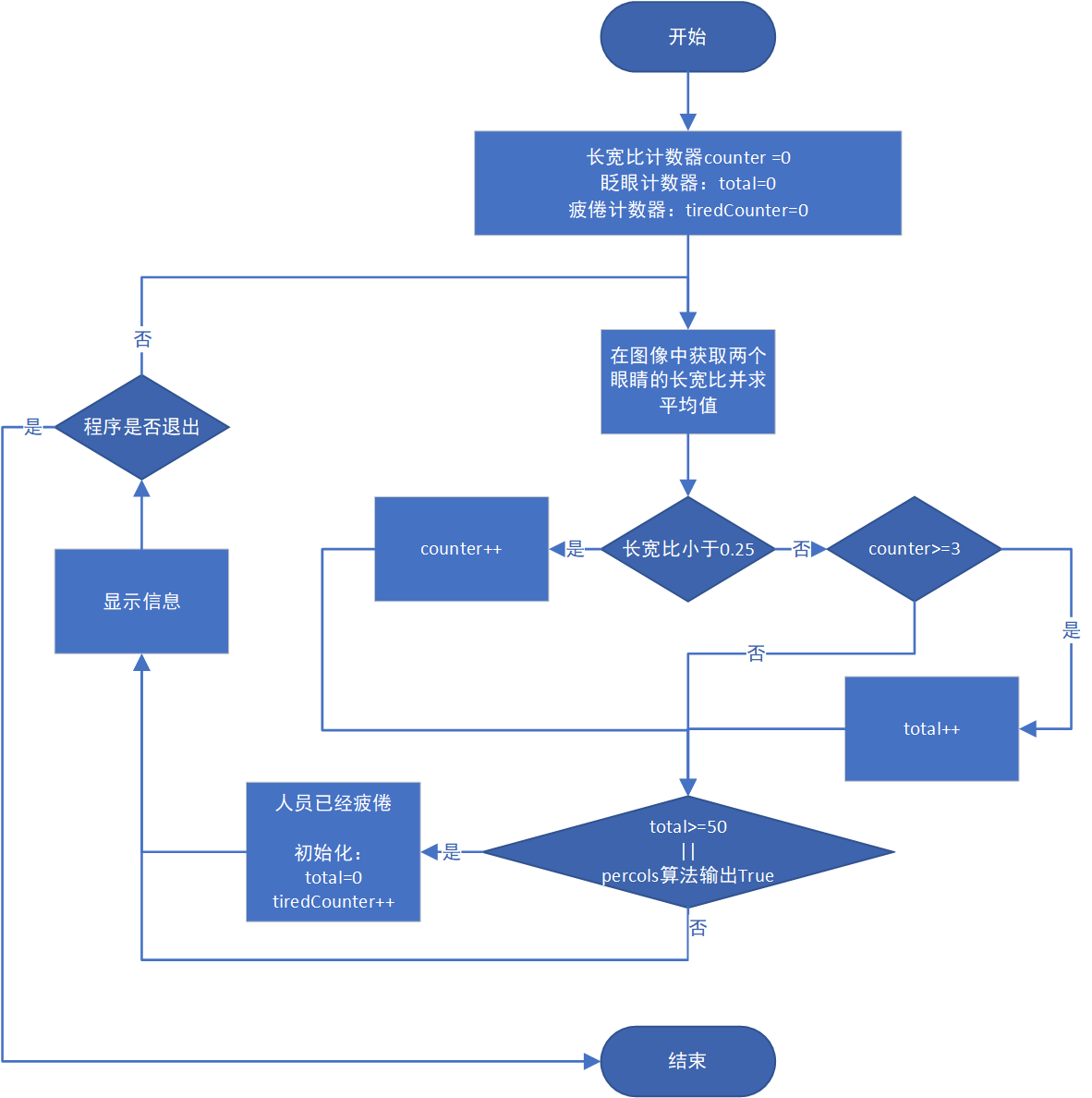
基于 EAR 与 PERCLOS 的疲劳检测流程图

EAR:把眼睛开合程度变成一个数值

在 68 点人脸关键点模型中,每只眼睛由 6 个点表示。设这 6 个二维坐标依次为 p1p6,眼睛长宽比定义为:

1
EAR = (||p2 - p6|| + ||p3 - p5||) / (2 × ||p1 - p4||)

分子是眼睛上下边缘的两组距离,分母是眼角之间宽度的两倍。眼睛睁开时 EAR 通常比较稳定;闭眼时上下眼睑靠近,EAR 会快速下降。左右眼通常同步眨动,因此程序取两只眼睛 EAR 的平均值,以减少单侧关键点抖动。

EAR 没有适合所有人的固定阈值。原始流程使用 0.25,这是一个可用的起点,但眼型、摄像头角度、镜片反光和关键点模型都会影响结果。更稳妥的做法是先采集数秒正常睁眼数据,再根据个人基线确定阈值。

1
2
3
4
5
def eye_aspect_ratio(eye: np.ndarray) -> float:
vertical_1 = np.linalg.norm(eye[1] - eye[5])
vertical_2 = np.linalg.norm(eye[2] - eye[4])
horizontal = np.linalg.norm(eye[0] - eye[3])
return float((vertical_1 + vertical_2) / (2.0 * horizontal + 1e-6))

PERCLOS:不要用单帧直接判断疲劳

一次普通眨眼也会产生很低的 EAR,因此“某一帧闭眼”并不等于疲劳。PERCLOS 关注的是一段时间内眼睛处于闭合状态的比例:

1
PERCLOS = 闭眼有效帧数 / 窗口内有效帧总数

严格的 P80 定义关注眼睑遮挡瞳孔超过 80% 的时间比例;本文没有直接测量瞳孔遮挡,而是用 EAR 阈值把每帧简化为“睁眼/闭眼”两种状态,因此这里计算的是适合原型验证的 PERCLOS 近似值。

原始文档中的 ratio = 0.8 可以理解为“窗口内至少有 80% 的时间保持睁眼”;换成闭眼占比,就是当 PERCLOS 超过 0.2 时发出提示。这里直接使用闭眼占比表达,含义更直观。

下面的监测器使用 deque 维护固定长度的滑动窗口。只有连续多帧低于 EAR 阈值才确认闭眼;未检测到人脸的帧不会加入队列,避免把离开画面误判成闭眼。

1
2
3
4
5
6
7
8
9
10
11
12
13
14
15
16
17
18
19
20
21
22
23
24
25
26
27
28
29
30
31
32
33
34
35
36
37
38
39
40
41
42
43
44
45
46
47
48
from collections import deque
from dataclasses import dataclass


@dataclass
class FatigueState:
perclos: float
is_tired: bool
ready: bool
closed_streak: int


class PerclosMonitor:
def __init__(
self,
fps: float,
window_seconds: float = 30.0,
ear_threshold: float = 0.25,
min_closed_frames: int = 3,
fatigue_threshold: float = 0.20,
warmup_seconds: float = 5.0,
) -> None:
self.ear_threshold = ear_threshold
self.min_closed_frames = min_closed_frames
self.fatigue_threshold = fatigue_threshold
self.closed_streak = 0
self.min_samples = max(1, int(fps * warmup_seconds))
self.window = deque(maxlen=max(1, int(fps * window_seconds)))

def update(self, ear: float) -> FatigueState:
if ear < self.ear_threshold:
self.closed_streak += 1
else:
self.closed_streak = 0

confirmed_closed = self.closed_streak >= self.min_closed_frames
self.window.append(1 if confirmed_closed else 0)
return self.current()

def current(self) -> FatigueState:
perclos = sum(self.window) / len(self.window) if self.window else 0.0
ready = len(self.window) >= self.min_samples
return FatigueState(
perclos=perclos,
is_tired=ready and perclos >= self.fatigue_threshold,
ready=ready,
closed_streak=self.closed_streak,
)

环境准备

示例使用 Python 3.10 及以上版本:

1
python -m pip install opencv-python numpy dlib

还需要下载 dlib 官方示例所使用的 shape_predictor_68_face_landmarks.dat,解压后把模型路径传给程序。某些平台安装 dlib 时需要本地 C++ 编译环境和 CMake;如果 pip 构建失败,应优先参考 dlib 的安装说明或使用包含 dlib 的 Conda 环境。

完整摄像头示例

把下面代码保存为 fatigue_detection.py

1
2
3
4
5
6
7
8
9
10
11
12
13
14
15
16
17
18
19
20
21
22
23
24
25
26
27
28
29
30
31
32
33
34
35
36
37
38
39
40
41
42
43
44
45
46
47
48
49
50
51
52
53
54
55
56
57
58
59
60
61
62
63
64
65
66
67
68
69
70
71
72
73
74
75
76
77
78
79
80
81
82
83
84
85
86
87
88
89
90
91
92
93
94
95
96
97
98
99
100
101
102
103
104
105
106
107
108
109
110
111
112
113
114
115
116
117
118
119
120
121
122
123
124
125
126
127
128
129
130
131
132
133
134
135
136
137
138
139
140
141
142
143
144
145
146
147
148
149
150
151
152
153
154
155
156
157
158
159
160
161
162
163
from __future__ import annotations

import argparse
from collections import deque
from dataclasses import dataclass
from pathlib import Path

import cv2
import dlib
import numpy as np


LEFT_EYE = slice(42, 48)
RIGHT_EYE = slice(36, 42)


def eye_aspect_ratio(eye: np.ndarray) -> float:
vertical_1 = np.linalg.norm(eye[1] - eye[5])
vertical_2 = np.linalg.norm(eye[2] - eye[4])
horizontal = np.linalg.norm(eye[0] - eye[3])
return float((vertical_1 + vertical_2) / (2.0 * horizontal + 1e-6))


def shape_to_array(shape: dlib.full_object_detection) -> np.ndarray:
return np.array(
[(shape.part(index).x, shape.part(index).y) for index in range(68)],
dtype=np.float32,
)


@dataclass
class FatigueState:
perclos: float
is_tired: bool
ready: bool
closed_streak: int


class PerclosMonitor:
def __init__(
self,
fps: float,
window_seconds: float = 30.0,
ear_threshold: float = 0.25,
min_closed_frames: int = 3,
fatigue_threshold: float = 0.20,
warmup_seconds: float = 5.0,
) -> None:
self.ear_threshold = ear_threshold
self.min_closed_frames = min_closed_frames
self.fatigue_threshold = fatigue_threshold
self.closed_streak = 0
self.min_samples = max(1, int(fps * warmup_seconds))
self.window = deque(maxlen=max(1, int(fps * window_seconds)))

def update(self, ear: float) -> FatigueState:
if ear < self.ear_threshold:
self.closed_streak += 1
else:
self.closed_streak = 0

confirmed_closed = self.closed_streak >= self.min_closed_frames
self.window.append(1 if confirmed_closed else 0)
return self.current()

def current(self) -> FatigueState:
perclos = sum(self.window) / len(self.window) if self.window else 0.0
ready = len(self.window) >= self.min_samples
return FatigueState(
perclos=perclos,
is_tired=ready and perclos >= self.fatigue_threshold,
ready=ready,
closed_streak=self.closed_streak,
)


def parse_args() -> argparse.Namespace:
parser = argparse.ArgumentParser(description="EAR + PERCLOS fatigue detector")
parser.add_argument("--model", type=Path, required=True, help="68-point model path")
parser.add_argument("--camera", type=int, default=0, help="camera index")
parser.add_argument("--ear", type=float, default=0.25, help="EAR threshold")
parser.add_argument("--perclos", type=float, default=0.20, help="PERCLOS threshold")
return parser.parse_args()


def main() -> None:
args = parse_args()
if not args.model.is_file():
raise FileNotFoundError(f"landmark model not found: {args.model}")

detector = dlib.get_frontal_face_detector()
predictor = dlib.shape_predictor(str(args.model))
camera = cv2.VideoCapture(args.camera)
if not camera.isOpened():
raise RuntimeError(f"cannot open camera {args.camera}")

fps = camera.get(cv2.CAP_PROP_FPS)
if not np.isfinite(fps) or fps < 1:
fps = 25.0

monitor = PerclosMonitor(
fps=fps,
ear_threshold=args.ear,
fatigue_threshold=args.perclos,
)

try:
while True:
ok, frame = camera.read()
if not ok:
break

gray = cv2.cvtColor(frame, cv2.COLOR_BGR2GRAY)
faces = detector(gray, 0)
state = monitor.current()
ear = None

if faces:
face = max(faces, key=lambda item: item.width() * item.height())
landmarks = shape_to_array(predictor(gray, face))
left_eye = landmarks[LEFT_EYE]
right_eye = landmarks[RIGHT_EYE]
ear = (eye_aspect_ratio(left_eye) + eye_aspect_ratio(right_eye)) / 2.0
state = monitor.update(ear)

for x, y in np.vstack((left_eye, right_eye)).astype(int):
cv2.circle(frame, (x, y), 2, (0, 255, 0), -1)

cv2.rectangle(
frame,
(face.left(), face.top()),
(face.right(), face.bottom()),
(255, 180, 0),
1,
)

ear_text = f"EAR: {ear:.3f}" if ear is not None else "EAR: no face"
status_text = "TIRED" if state.is_tired else ("MONITORING" if state.ready else "WARMING UP")
status_color = (0, 0, 255) if state.is_tired else (0, 200, 0)

cv2.putText(frame, ear_text, (20, 30), cv2.FONT_HERSHEY_SIMPLEX, 0.7, (255, 255, 255), 2)
cv2.putText(
frame,
f"PERCLOS: {state.perclos:.1%}",
(20, 60),
cv2.FONT_HERSHEY_SIMPLEX,
0.7,
(255, 255, 255),
2,
)
cv2.putText(frame, status_text, (20, 95), cv2.FONT_HERSHEY_SIMPLEX, 0.85, status_color, 2)
cv2.imshow("Fatigue detection", frame)

key = cv2.waitKey(1) & 0xFF
if key in (ord("q"), 27):
break
finally:
camera.release()
cv2.destroyAllWindows()


if __name__ == "__main__":
main()

运行方式:

1
2
3
4
5
python fatigue_detection.py \
--model ./shape_predictor_68_face_landmarks.dat \
--camera 0 \
--ear 0.25 \
--perclos 0.20

Windows PowerShell 中可以写成单行命令,或者使用反引号代替上面的反斜杠续行。

参数应该怎样调整

EAR 阈值

让使用者自然看向摄像头并保持睁眼 5 到 10 秒,记录 EAR 的中位数作为睁眼基线。再采集几次正常眨眼,观察闭眼谷值。阈值应位于两组数值之间,而不是直接假设所有人都适合 0.25

连续闭眼帧数

原始流程使用 3 帧。在 30 FPS 下约为 100 毫秒,在 15 FPS 下则约为 200 毫秒,因此同一个帧数在不同摄像头上代表不同时间。正式实现最好按时间计算,例如把确认时长设为 100 到 200 毫秒,再根据实际 FPS 换算帧数。

PERCLOS 窗口与阈值

示例使用 30 秒窗口和 0.20 阈值,目的是复现原始文档中“睁眼比例低于 80%”的逻辑,并不代表通用标准。窗口太短时对一次长眨眼过于敏感,太长则会延迟告警。阈值应通过目标场景的数据验证,同时记录误报率和漏报率。

常见误判及改进方向

  • 未检测到人脸:不要直接当作闭眼,应暂停 PERCLOS 采样,并单独提示调整位置。
  • 侧脸或低头:二维 EAR 会受到较大头部姿态影响,可以加入姿态估计或使用三维关键点。
  • 眼镜反光与弱光:增加补光、使用红外摄像头,或换用在目标环境中训练的眼睛状态模型。
  • 个体差异:启动时做个人 EAR 标定,通常比全局固定阈值更可靠。
  • 单一指标不足:可进一步融合闭眼持续时间、眨眼频率、哈欠、头部姿态和方向盘行为。
  • 性能问题:可以缩小检测图像、隔帧执行人脸检测,并在相邻帧使用跟踪器维护人脸区域。

结果与边界

EAR 的优势是计算量小、结果可解释,PERCLOS 又能把单帧信号转化为时间窗口统计,因此二者很适合教学、原型验证和资源受限设备。但它们依赖关键点质量,并且“眼睛长时间闭合”只覆盖疲劳表现的一部分,不能识别所有形式的注意力下降。

真正部署前,应在目标摄像头、安装角度、光照、眼镜类型和人群上建立测试集,分别统计正常、眨眼、低头、侧脸、遮挡和真实疲劳片段。只有经过这些验证,阈值才有实际意义。

参考资料

文章作者: ximikang
文章链接: https://ximikang.com/2026/08/07/%E5%9F%BA%E4%BA%8Edlib-EAR-PERCLOS%E7%9A%84%E5%AE%9E%E6%97%B6%E7%96%B2%E5%8A%B3%E6%A3%80%E6%B5%8B/
版权声明: 本博客所有文章除特别声明外,均采用 CC BY-NC-SA 4.0 许可协议。转载请注明来自 Ximikang Blog